
ME


Case study
Design Bandit
Steal the style. Build with intention.
A personal Chrome extension for extracting visual inspiration from websites and turning it into an actionable design system.

Overview
About the project
Design Bandit was created for the moments when I find a website whose visual language I want to understand and recreate in my own projects.
Instead of simply saving screenshots or bookmarking a website, the extension breaks down its visible design signals: colors, typography, headings, hierarchy, layout patterns, and interface components. It then generates a structured design report that can be scanned, compared, and used as a reference while building new web experiences.
The goal is not to copy websites literally. It is to understand what makes a design effective and transform that inspiration into an original, intentional direction.
The problem
Inspiration is easy to save, difficult to understand
- Screenshots lack contextA screenshot shows what a page looks like, but not the typography system, color roles, layout logic, or component patterns behind it.
- Bookmarks do not explain the designSaving a URL preserves access to the page, but not the reasoning behind why the interface feels effective.
- Design details are easy to forgetAfter switching between multiple projects, the visual decisions that inspired me are often lost.
- Recreating inspiration requires manual researchIdentifying fonts, colors, spacing, hierarchy, and interaction patterns takes time and interrupts the creative process.
- Visual inspiration needs to become actionableA mood or screenshot is useful, but a structured brief is easier to apply to a real project.
The solution
A personal design intelligence layer
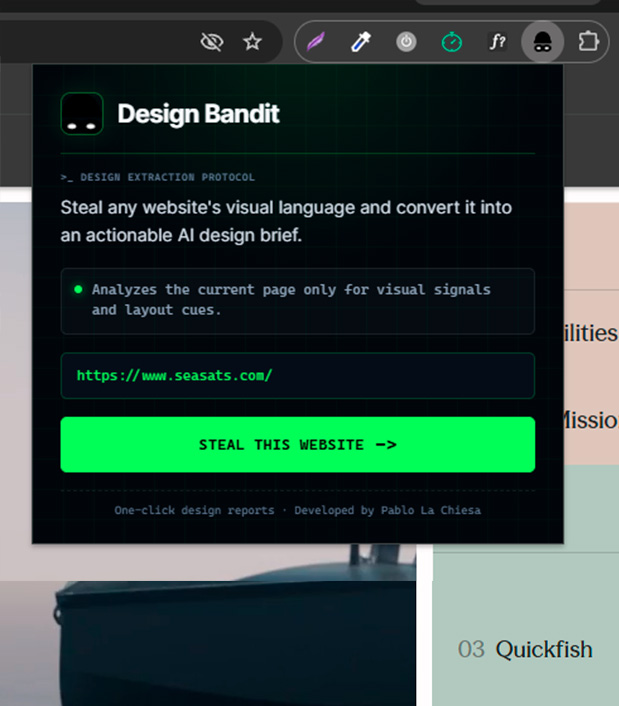
I developed a Manifest V3 Chrome extension that analyzes the current webpage and converts its visible design signals into an AI-assisted design report.
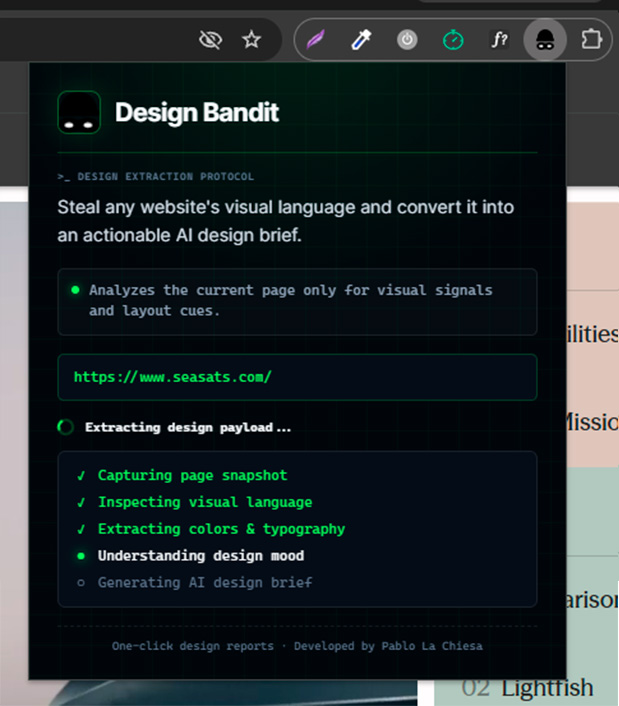
With one click, Design Bandit collects information from the active page and sends it to a local backend. Gemini processes the extracted data and returns a structured analysis with visual observations, design recommendations, free Google Fonts alternatives, and alternative color palettes.
The result is a practical reference document that helps me move from “I like this website” to “I understand how to build something with a similar design feeling.”
Key features
- One-click page analysisInspect the active webpage directly from the Chrome extension popup.
- DOM-based visual extractionCollect visible colors, font families, headings, metadata, and body text signals.
- Design mood and DNA analysisUnderstand the emotional direction, style tags, visual traits, and likely industry context.
- Color palette extractionReview detected colors with HEX values, usage suggestions, and contrast notes.
- Typography hierarchyAnalyze heading structure, body typography, font roles, and hierarchy recommendations.
- Google Fonts alternativesReceive curated free font alternatives that match the original direction.
- Layout and component recommendationsReview notes for navigation, spacing, responsive behavior, cards, CTAs, and reusable patterns.
- Interactive report and persistenceCopy font names and colors directly, then save every analysis as a JSON report.
- Fallback analysisContinue producing a usable report when Gemini is temporarily unavailable.
- Cyber Heist interfaceUse a dark terminal-inspired visual language with neon green extraction states and technical metadata.
Engineering
Technical highlights
Manifest V3 extension architecture
The popup identifies the active tab and uses chrome.scripting.executeScript() to inspect the page DOM. Browser-side logic stays focused on collecting page data and opening the resulting report while AI processing and persistence remain in the backend.
DOM-based design signal extraction
The extension extracts signals available directly from the page, avoiding the cost and complexity of sending screenshots to an AI model while still providing useful typography, color, hierarchy, and content analysis.
const results = await chrome.scripting.executeScript({
	target: { tabId: activeTab.id },
	func: inspectPageDOM
});

return {
	url: window.location.href,
	title: document.title,
	colors: getColors(),
	fontFamilies: getFonts(),
	headings: getHeadings()
};
Local AI backend
An Express backend receives the extracted page data and sends a structured prompt to Gemini. The backend normalizes the model response so every report shares the same expected structure, even when the AI response is incomplete.
API key isolation
The Gemini API key is loaded from .env and never reaches the extension. The browser only communicates with the local analysis endpoint at http://localhost:3001/api/analyze.
const response = await fetch("http://localhost:3001/api/analyze", {
	method: "POST",
	headers: { "Content-Type": "application/json" },
	body: JSON.stringify(pageData)
});
Each report is saved as an individual JSON file inside the backend, keeping reports easy to inspect, archive, or migrate to a database later. Gemini retries temporary availability errors and the fallback analyzer keeps the workflow useful when a response is invalid or unavailable.
Result
Impact
Design Bandit turns passive browsing into an active design research workflow. It helps me capture the visual qualities I admire, understand the systems behind them, and translate those observations into practical decisions for my own websites.
The tool reduces the distance between inspiration and implementation. Instead of collecting disconnected screenshots and bookmarks, I get a reusable design brief containing typography references, color directions, layout observations, component ideas, and actionable recommendations.
Because it is designed for personal use, the architecture remains intentionally lightweight: a Chrome extension, a local Node.js backend, Gemini for analysis, and JSON files for persistence.
Takeaways
Skills demonstrated
Future improvements
Next steps
- Add report history, search, and side-by-side comparison.
- Build a local gallery of saved reports with editable notes and tags.
- Extract more component types, spacing, and border-radius patterns.
- Add optional screenshot support and export to Markdown or PDF.
- Create a “save to project” workflow for selected fonts, colors, and recommendations.